Is this trip worth it? Any red flags? Know before you accept.
When a request comes in on Uber, Bolt or InDrive, Takit shows your real profit after fuel and car costs, and flags possible scams and risky riders, in about a second. Take it, or leave it.
See it on real requests
One minute on Uber, Bolt and InDrive in Cape Town. Passenger details are blurred. The video downloads only when you tap play (about 4 MB).
How it works
Takit sits quietly in the background while you drive. You keep using Uber, Bolt and InDrive exactly as before.
A request comes in
Takit reads the fare, pickup distance, trip distance and time from the request on your screen.
It works out your costs
Fuel, wear, the app's commission and the drive to the pickup, using your own car and fuel price.
You see the answer
A banner at the top of the screen tells you your profit, before you tap Accept.
Three answers, one glance
Colours you can read at a traffic light. Turn on vibration or a spoken result if you'd rather not look.
Take it. It pays above your target after all costs.
Think twice. You make a little. On InDrive, Takit shows which counter-offer reaches your target.
Leave it. After fuel and costs, this trip costs you money.
Everything a driver needs, nothing more
Real profit on every request
Rand profit, rand per km and rand per hour, worked out from your own car, fuel price and the app's commission.
InDrive counter-offers
See which fare button reaches your target, and the trip length an offer is worth when InDrive hides the distance.
Areas to avoid
Your own list of suburbs to avoid, day or night, for pickups or drop-offs. One tap adds an area you've just seen.
New or low-rated riders
A warning when the rider has very few trips or a low rating.
Your shift summary and weekly report
Trips, earnings, costs and profit per hour for each shift and each week, per app and in total. Counted automatically.
Fill-ups and your real fuel use
Tap I filled up when you buy fuel. Takit learns how much fuel your car really uses and suggests better settings, on every plan. On Pro, see what each tank earned you.
Hands-free alerts
Optional vibration and a spoken result, a compact banner, and top or bottom placement.
Reservations and scheduled rides
Uber reservations and Bolt scheduled rides don't show a pickup distance, so Takit tells you how far away you can be for the ride to still be worth it.
Possible scam warning
On InDrive, a dark "Possible scam" banner when the rider's note asks you to buy or pay for something, when pickup and drop-off are the same place or a few doors apart (no trip line on the map), or for a risky cash courier job.
Your week, in one report
Every Monday morning, when the platforms pay out, Takit shows how last week really went and what to change. Monday to Sunday, like your pay week.
- Your week in one lineProfit, trips, hours online and rand per hour, compared with last week.
- Each app side by sideSee which of Uber, Bolt and InDrive actually paid you best.
- Your best and slowest timesThe days and hours that earn you the most, so you can plan your shifts.
- Your habits, in randThe EISH! trips you took, the SHARP! trips you let go, and what each cost you.
- Two tips for next weekPlain advice from your own driving, not from guesswork.
Share your week on WhatsApp with one tap: a picture of your totals, without trip details. Your report is worked out on your phone and stays there.
| App | Trips | Profit | Per hour |
|---|---|---|---|
| Bolt | 18 | R1,120 | R140 |
| Uber | 15 | R890 | R118 |
| InDrive | 8 | R330 | R92 |
Private and safe by design
- Takit only reads the request on your screen.
- It never taps, accepts or declines anything. You decide.
- Nothing about you, your riders or your trips leaves your phone.
- No account, no login, no tracking.
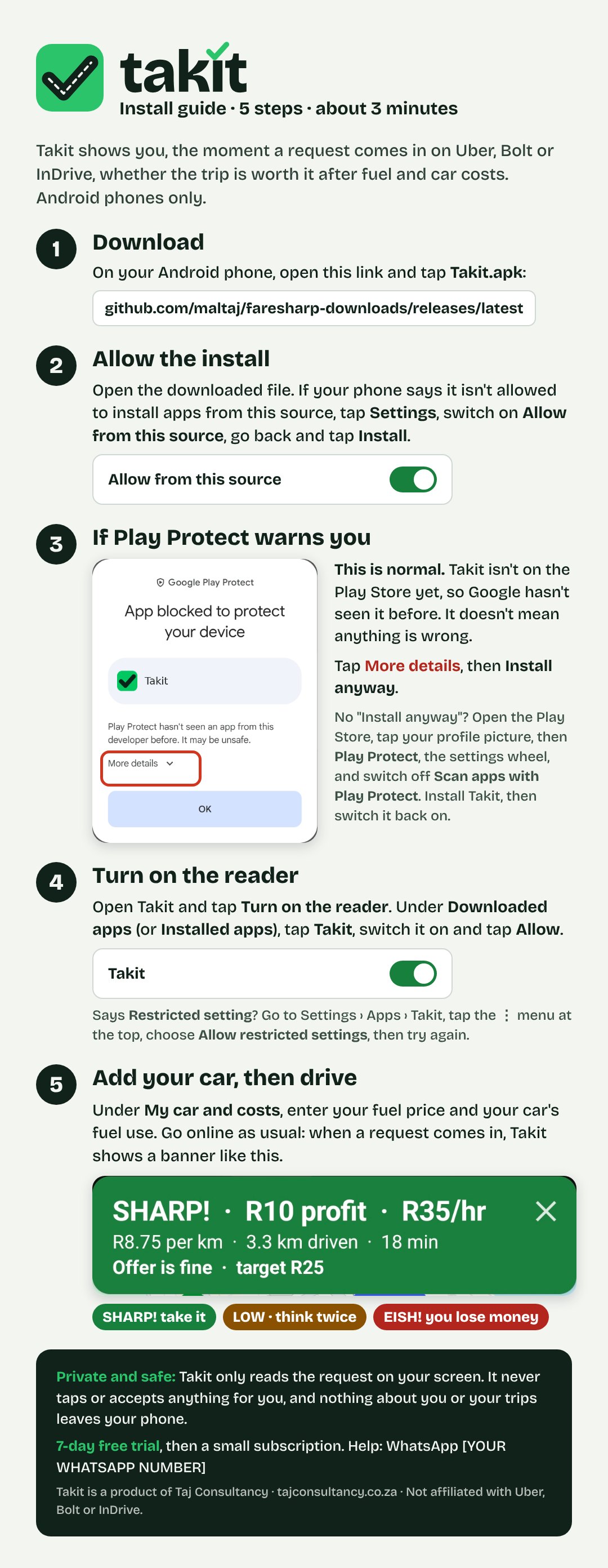
Install in about 3 minutes
Takit isn't on the Play Store yet, so you install it straight from this site. Your phone will ask a few extra questions. Here's what to tap.
Download
On your Android phone, tap Download for Android above. Takit.apk (about 23 MB, best on Wi-Fi) downloads.
Download stuck at 100%? Cancel it and use the backup download page: tap Takit.apk under Assets. Still stuck? WhatsApp us on 072 508 5577 and we'll send the file to you.
Allow the install
Open the file. If your phone says it can't install apps from this source, tap Settings, switch on Allow from this source, go back and tap Install.
If Play Protect warns you
You may see "App blocked to protect your device". This is normal for apps that aren't on the Play Store yet: Google hasn't seen Takit before. Tap More details, then Install anyway.
No "Install anyway"? Open the Play Store, tap your profile picture, then Play Protect, the settings wheel, and switch off Scan apps with Play Protect. Install Takit, then switch it back on.
Turn on the reader
Open Takit and tap Turn on the reader. Under Downloaded apps (or Installed apps), tap Takit, switch it on and tap Allow.
Says Restricted setting? Go to Settings › Apps › Takit, tap the ⋮ menu, choose Allow restricted settings, then try again.
Tell Takit about your car, then drive
Answer three quick questions: what you drive, petrol or diesel, and how old it is (renting? add your weekly rent). Takit works out your costs. Go online as usual, and the banner appears with each request.
Simple pricing
Start with 7 days of Pro, free. After that, keep Takit free on one app, or pick the plan that suits how you drive.
For trying Takit on the app you use most.
- Profit, R per km and a SHARP! or EISH! answer on 1 app you choose
- ⚠ Possible scam and risky rider warnings on all 3 apps
- InDrive counter-offer advice
- Up to 3 areas to avoid
- Shift summary and weekly report
For drivers on Uber, Bolt and InDrive who want the money advice.
- Everything in Free, on all 3 apps
- InDrive counter-offer advice
- As many areas to avoid as you like, day and night
- Shift summary and weekly report
- Spoken result and reservation advice
For full-time drivers who want to see how every shift really went.
- Everything in Plus
- Shift summary: profit per hour, per app
- Monday weekly report with tips
- What each tank of fuel earns you
- Spoken result, hands-free
- Reservations and scheduled rides advice
Founding drivers: the first 100 drivers get Pro for R39 a month, locked for as long as they keep paying.
How to pay and activate
- In Takit, open Subscription and tap Copy device code.
- Pay for your plan and send your device code with proof of payment on WhatsApp to 072 508 5577.
- You get an activation code back. Paste it in Takit and tap Activate. Your days start then.
Ways to pay
Payment details are sent on WhatsApp. Renewing early adds the new days after your current ones.
Questions drivers ask
Is it allowed by Uber, Bolt and InDrive?
Takit isn't made, approved or endorsed by Uber, Bolt or InDrive. It works like a screen reader: it only reads what's on your screen and never taps, accepts or declines anything, so you stay in control of every trip.
Why does my phone warn me when I install it?
Android warns about every app that comes from outside the Play Store. Takit isn't on the Play Store yet, so Google hasn't seen it before. The install steps above show what to tap.
Does it use a lot of data or battery?
No. Everything is worked out on your phone. The only internet it uses is a small check for new versions a few times a day.
Does it work on iPhone?
No. iPhones don't allow an app to read another app's screen, so Takit is for Android phones only (Android 8 or newer).
Does the free trial need a card?
No. You get 7 days of Pro, starting when you first open Takit. Nothing is charged automatically, and when the 7 days end Takit doesn't stop: it keeps working on the Free plan.
What do I get on the Free plan?
Profit, rand per km and a SHARP! or EISH! answer on one app you choose, possible-scam and risky-rider warnings on all three apps, and up to three areas to avoid. Plus adds all three apps, InDrive counter-offers and as many areas to avoid as you like. Pro adds the shift summary and weekly report, the spoken result and reservation advice.
Can I change plans?
Yes. Message us on WhatsApp. A Pro code starts the moment you activate it, even in the middle of a Plus plan, and we'll credit the days you have left on Plus.
What if I get a new phone?
An activation code works on one phone. Message us on WhatsApp with your new device code and we'll move your remaining time across.
Are the numbers exact?
They're estimates from your own car settings, and they get better the more accurately you fill those in. Your app's earnings page shows what you were actually paid.
Need help or want to pay?
Message us on WhatsApp. We're drivers too.